
Professional CAD. Free. Online.
FabDesk is free, browser-based parametric 3D CAD for mechanical engineering and product design. Model parts, assemblies and sheet metal, make engineering drawings, run simulations, and let FabAgent model from a description. Nothing to install, and you can start without an account.
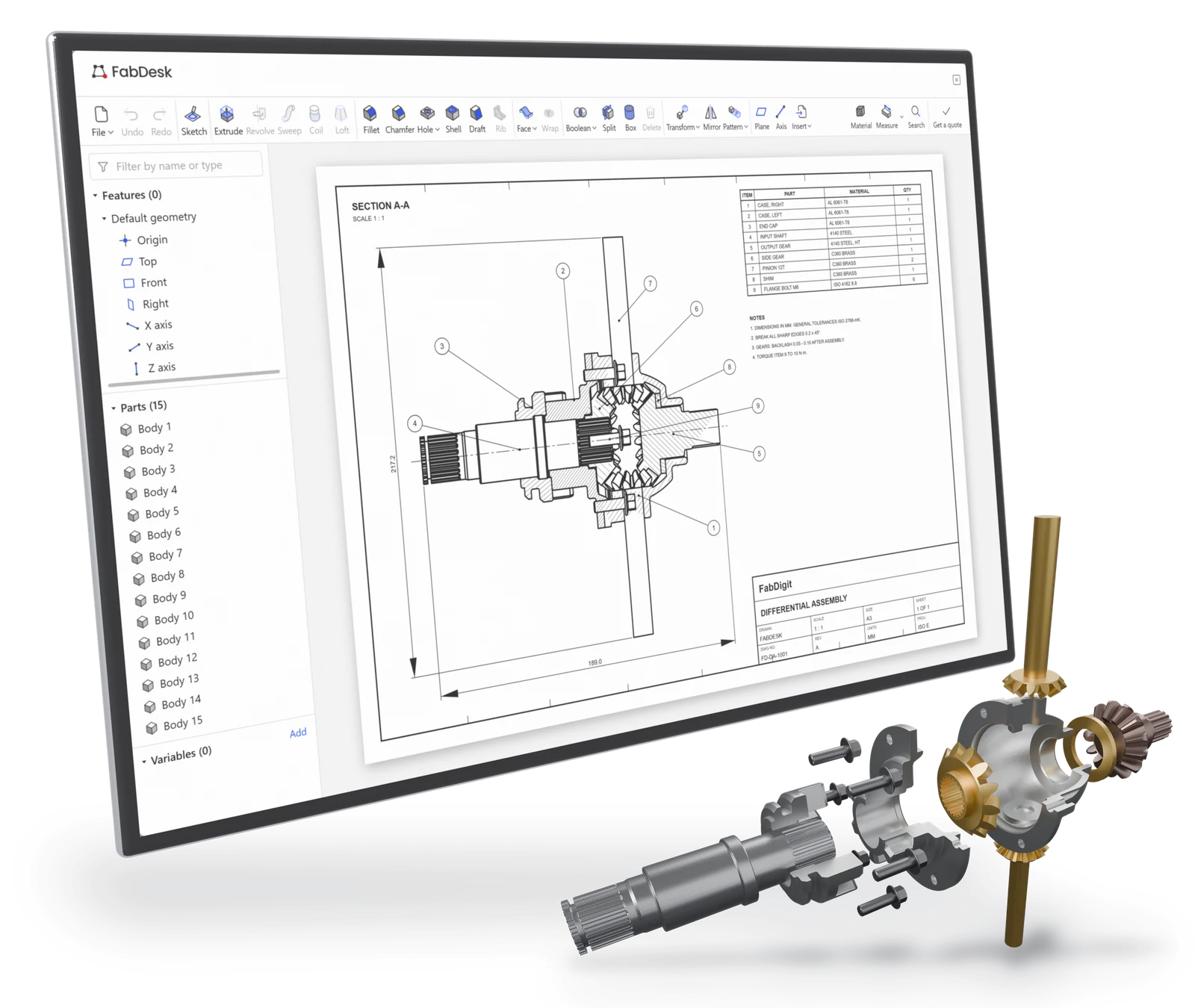
Professional mechanical CAD in one browser tab
Parts, assemblies, drawings and simulation in one window. Free for commercial use, and your designs stay private.
Parametric modeling
Dimensions and relations fix the sketch, and the sketch tells you when it is under, fully or over defined.
Solid features
Extrude, Revolve, Sweep and Loft, then shells, ribs, drafts, fillets, chamfers and patterns.
Engineering drawings
Projected, section, detail and auxiliary views with dimensions, GD&T and a bill of materials.
STEP in and out
Open a STEP or IGES file from another CAD program, add features to it and export the result as STEP.
Change a dimension and the part follows
Each sketch, extrude, hole and fillet is a step in the feature tree. Edit any step and everything built on it rebuilds; drag the rollback bar to see the part as it was before that step. Parts are exact B-rep solids, so the STEP export keeps true circles and surfaces.
Assemblies, sheet metal and other CAD files
The same window has an Assembly tab and a Sheet Metal tab, and opens the files other CAD programs save.
Assemblies
Insert parts, place them with standard, advanced and mechanical mates, check for interference and list them in a bill of materials.
Sheet metal
Base, edge and miter flanges, hems, sketched bends, vents and tab and slot, from a gauge table, unfolded to a flat pattern.
Native CAD files
SOLIDWORKS, Inventor, Fusion, FreeCAD, Parasolid, NX and CATIA parts open without the program that made them; AutoCAD DWG opens as a sketch.
Holes, threads and mass properties
The Hole tool places plain, counterbored, countersunk, tapped and slotted holes from 19 standards, and threads are modeled as real geometry.
Measure gives distances and diameters. Mass properties give mass, volume, surface area, center of mass and inertia for the material you pick.
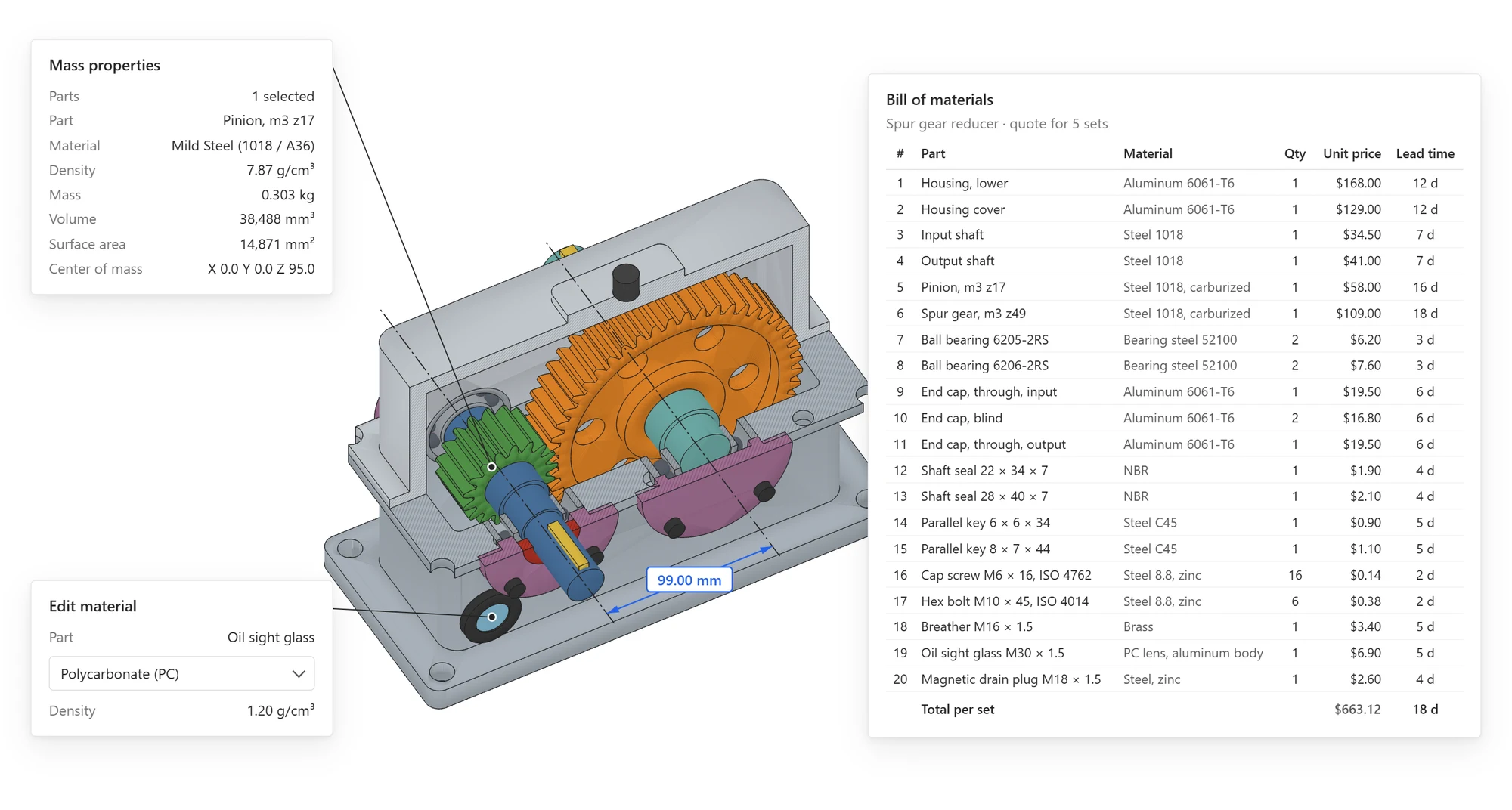
2D drawings made from the solid
The Drawing tab places projected, section, detail and auxiliary views of the part, then dimensions, GD&T, surface finish symbols, datums, notes, balloons and tables. A drawing can run to several sheets and saves as PDF or DXF.
FEA in FabDesk: stress, vibration and thermal analysis
Run FEA on the part you just modeled, in the same window. Pick a study, apply fixtures and loads, and click Run. Free, with nothing to install, on any computer that runs FabDesk.
See stress, displacement and factor of safety on the deformed shape, animate mode shapes, and probe temperature over time.
Study types
| Study | What it tells you |
|---|---|
| Static | Stress, displacement, strain and factor of safety under forces, pressure, torque, bearing loads and gravity. |
| Frequency | Natural frequencies, mode shapes and modal mass participation. |
| Buckling | Predicted buckling load factors and their corresponding mode shapes. |
| Thermal | Steady-state or transient temperature and heat flux for specified temperatures, convection, applied heat flux or heat input power. |
| Linear Dynamic | Structural response using modal time history, harmonic, response spectrum or random vibration analysis. |
| Fatigue | Damage and life under repeated loading, from an S-N curve and the static results of each load case. |
| Pressure Vessel Design | Combines results from static load cases for pressure vessel stress checks. |
More: free FEA software in FabDesk.
Describe a part and FabAgent models it
FabAgent is the AI built into FabDesk. Describe the part in plain words and give its dimensions; FabAgent models it with real sketches and features, the same ones on the toolbar.
Change a dimension in the feature tree, or just ask FabAgent. Free to use.
Model and edit
Adds sketches, extrusions, cuts, holes, threads, fillets, chamfers, shells and patterns. You can also ask FabAgent to edit an earlier feature.
Drawings and materials
Places views and dimensions on a drawing sheet. Assigns a material from the FabDesk library and reports mass.
Assemblies and fasteners
Inserts and mates parts in the Assembly tab and adds standard ISO screws, washers and nuts at matching holes.
More: text to CAD with FabAgent.
CAD Cloud, version history and sharing
With a free account every part saves to CAD Cloud as you work, so you can close the tab and pick it up on another computer.
Folders and files
Keep parts in folders, rename and move them, make a copy, or export any format straight into a CAD Cloud folder.
Version history
Every saved change is listed by day. Open an older one to look at it, restore it, or name the current state as a version.
Share with people
Invite people by email to view or to edit, or make a link for your workspace or anyone signed in, with an expiry date. Manage access shows who has it.
Hole standards
19 standards, 8 hole types: Counterbore, Countersink, Hole, Straight Tap, Tapered Tap, Counterbore Slot, Countersink Slot and Slot.
| Standards | Holes |
|---|---|
| ANSI Inch, ANSI Metric, AS, BSI, DIN, GB, IS, ISO, JIS, KS | Counterbores, countersinks, clearance and tap drill holes |
| DME, HASCO Metric, PCS, Progressive, Superior | Screw heads and pin clearances for mould bases |
| Helicoil® Inch, Helicoil® Metric | Tapped holes for helical inserts |
| PEM® self-clinching | Mounting holes for self-clinching fasteners |
| Ensat® inserts | Holes for self-tapping threaded inserts |
File formats
Open STEP, IGES, Parasolid and native parts from SOLIDWORKS, Inventor, Fusion, FreeCAD, NX and CATIA without the program that made them. AutoCAD DWG opens as a sketch, and mesh files open and save too.
| Format | Open | Save | What it holds |
|---|---|---|---|
| STEP (.step, .stp) | Yes | Yes | The solid, readable by every CAD program and by the quote. |
| IGES (.iges, .igs) | Yes | Yes | Surfaces in millimetres, for older CAD and CAM programs. Surfaces that close are read as solids. |
| FabDesk model (.fabdesk) | Yes | Yes | Sketches, the feature tree and drawings, so the part stays editable. |
| SOLIDWORKS part (.sldprt) | Yes | No | Opens without SOLIDWORKS, to view, measure and build on. |
| SOLIDWORKS assembly (.sldasm) | Yes | No | Opens with its part files (select them all, or one ZIP), each part in place. |
| Inventor, Fusion, FreeCAD, Parasolid, NX (.ipt, .f3d, .fcstd, .x_t, .x_b, .prt) | Yes | No | Opens without the program that made it, to view, measure and build on. |
| CATIA V5 (.catpart) | Yes | No | Opens without CATIA, to view, measure and build on. |
| Creo, Rhino, ACIS, JT (.prt, .3dm, .sat, .sab, .jt) | Yes | No | Opens as a mesh to view and measure. |
| AutoCAD drawing (.dwg) | Yes | No | R13 (1994) to the 2018 format, opened like a DXF: a sketch on the Top plane. |
| STL | Yes | Yes | A triangle mesh in millimetres, for 3D printing and slicers (a file saved in metres is scaled to millimetres). Opens as a mesh; Convert to Body makes a closed one a solid you can edit and save as STEP. |
| 3MF | Yes | Yes | The same mesh with one object per part, for 3D printing. |
| OBJ | Yes | Yes | The same mesh, for rendering and mesh tools. |
| glTF (.glb, .gltf) | Yes | GLB | A mesh for the web and AR. Read and written in metres, as its standard says. A .gltf with a separate .bin opens when both are selected, or from one ZIP. |
| FBX | Yes | Yes | A mesh for Blender, Unity, Maya and 3ds Max. Saved as binary FBX 7.4. |
| USDZ | No | Yes | The part for AR Quick Look on iPhone, iPad and Vision Pro, in metres, standing upright. |
| PLY, AMF, COLLADA (.dae), 3DS | Yes | No | A mesh to view, measure and convert to a body. |
| SVG | Yes | Yes | Opened as a sketch on the Top plane, ready to extrude. Saved from the drawing sheets in millimetres, one group per line type. |
| No | Yes | The drawing sheets, as vector lines and text. | |
| DXF | Yes | Yes | Text or binary DXF, opened as a sketch on the Top plane, ready to extrude. Saved from the drawing sheets, for a 2D CAD program or a laser cutter. |
| ZIP, RAR, 7z | Yes | No | Read in your browser; the part inside opens (a solid first, then a mesh, then a drawing). |
| PNG | No | Yes | A screenshot of the view. |
From sketch to STEP in four steps
- 01
Sketch
Draw a 2D profile on a plane and fix it with dimensions and relations.
- 02
Model
Extrude or revolve it, then add holes, fillets, shells and threads.
- 03
Document
Place the views on a drawing sheet and add dimensions and notes.
- 04
Export
Save the editable .fabdesk model, or export STEP, IGES, STL, 3MF, OBJ, GLB, FBX, USDZ, PDF, DXF and SVG.
Works on Windows, Mac, Linux and Chromebook
FabDesk is a web app, so the operating system does not matter; the browser and the screen do.
| Needs | Detail |
|---|---|
| Operating system | Windows, macOS, Linux or ChromeOS |
| Browser | A current Chrome or Edge, with WebGL 2 and WebAssembly turned on |
| Screen | A window at least 768 px wide |
| Input | A mouse or a trackpad; phones and tablets are not supported yet |
| Connection | Needed to open FabDesk; modeling then runs in the browser |
Sketch, part and drawing commands
Sketch
Line
Straight lines, centerlines and chained profiles.
Rectangle
Corner, center and 3-point rectangles, and parallelograms.
Circle and Arc
Circles by center or three points; centerpoint, tangent and 3-point arcs.
Slot and Polygon
Straight slots, and triangles, hexagons and other regular polygons.
Spline
Smooth curves through points or shaped by control points.
Trim
Cuts a line or circle back to where it crosses another.
Offset
Copies edges or sketch lines at a set distance.
Dimension
Sizes a line, circle or arc; type a new value and the sketch follows.
Relations
Horizontal, parallel, tangent, equal, symmetric and more hold the shape.
Part
Extrude
Pushes a sketch into a solid, or cuts it out of one.
Revolve
Spins a sketch around an axis: shafts, rings, knobs.
Sweep
Moves a profile along a path: tubes, handles, springs.
Loft
Joins two or more profiles into one smooth solid.
Coil
Makes a helix-shaped solid such as a spring.
Shell
Hollows a solid to a wall thickness and opens the faces you pick.
Draft
Tilts faces so a moulded or cast part releases.
Rib
Adds a thin wall from an open sketch line.
Fillet and Chamfer
Rounds or bevels the edges you pick.
Hole
Places standard holes on a face at sketched points.
Thread
Cuts or adds a modelled thread on a cylinder.
Mirror and Pattern
Copies features across a plane, in a row or around an axis.
Measure
Distances, angles, diameters and radii between picked items.
Mass Properties
Volume, surface area, mass, center of mass and principal moments of inertia for the chosen material.
Section View
Cuts the view on a plane to show the inside.
Drawing
Three-View Layout
Front, top and right views of the part in one click.
Projected View
Folds a new view off an existing one.
Section View
Cuts the part along a line and hatches the cut face.
Detail View
Enlarges a circled area at a larger scale.
Auxiliary View
Looks square onto an angled face.
Break View
Shortens a long part between break lines.
Geometric Tolerance
Feature control frames and datum feature symbols.
Surface Finish
Surface finish symbols, hole callouts and weld symbols.
Balloons and BOM
Balloons, auto balloons and a bill of materials table.
FabDesk compared with other free and low-cost CAD
Licence, privacy, AI, simulation and the core CAD tools, side by side.
| Program | Runs on | Cost | Free forpaid work | Privatefiles | Noinstall | Nosign‑up | AImodeling | Simulation(FEA) | NativeCAD files | 2Ddrawings | Featuretree | STEPexport | Quotebuilt in |
|---|---|---|---|---|---|---|---|---|---|---|---|---|---|
| FabDesk | Browser on Windows, macOS, Linux and ChromeOS | Free plan, commercial use allowed | Yes | Yes | Yes | Yes | Yes | Yes | Yes | Yes | Yes | Yes | Yes |
| FreeCAD | Installed app for Windows, macOS and Linux | Free and open source | Yes | Yes | No | Yes | No | Yes | No | Yes | Yes | Yes | No |
| Onshape Free | Browser, iOS and Android | Free for non-commercial work; every document is public | No | No | Yes | No | No | No | Yes | Yes | Yes | Yes | Add-in only |
| Fusion for personal use | Installed app for Windows and macOS | Free for non-commercial use, revenue under $1,000 a year | No | Yes | No | No | Limited | Limited | Limited | Limited | Yes | Yes | Add-in only |
| SOLIDWORKS for Makers | Installed app for Windows, or a browser-only xDesign plan | $48 a year for either plan, personal projects under $2,000 a year | No | Yes | Limited | No | No | No | Limited | Yes | Yes | Yes | Add-in only |
| Tinkercad | Browser and iPad | Free | Yes | Yes | Yes | No | No | No | No | No | No | No | No |
Free for paid work: the free plan allows commercial use. Private files: the free plan keeps your designs private (FreeCAD files stay on your computer). “Add-in only” means the program needs a third-party add-in. Onshape’s AI Advisor answers questions but does not model; Autodesk Assistant in Fusion is a technology preview that edits existing models. Quote built in: Quote this part prices the open model in the material and quantity you pick and checks it for features that are hard or costly to make. Checked on each vendor’s own pages on 24 November 2026. Names identify the products compared and belong to their owners.
More detail: FabDesk vs Onshape, SOLIDWORKS alternatives, Fusion 360 alternatives, FreeCAD online, Tinkercad alternatives, text to CAD, free FEA software, CAD on a Mac and CAD on a Chromebook.
Get the part made
Quote this part opens a quote with the solid from FabDesk, in the material and quantity you priced it in. Change the process, material, finish and quantity there. Eligible parts are priced instantly; the rest are priced by an engineer.
FAQ
Is FabDesk free?
Yes, including commercial use. The free plan covers parametric 3D modeling, assemblies, 2D drawings, simulation and STEP, PDF and DXF export, and your designs stay private.
Do I need to download or install anything?
No. FabDesk runs in a desktop web browser, so you can start designing without installing CAD software.
Do I need an account to use FabDesk?
Not to start. You can open FabDesk and model a part without an account. Saving, exporting and quoting need a free account, which keeps each part in CAD Cloud so you can reopen it later.
Does FabDesk work on a Mac or a Chromebook?
Yes. FabDesk runs in Chrome or Edge on Windows, macOS, Linux and ChromeOS. It needs a mouse or trackpad and a window at least 768 px wide.
Does FabDesk work on a phone or an iPad?
Not yet. FabDesk needs a mouse and a window at least 768 px wide.
What file formats does FabDesk support?
FabDesk opens STEP, IGES and native .fabdesk files as solids; SOLIDWORKS, Inventor, Fusion, FreeCAD, Parasolid, NX and CATIA parts without the program that made them; Creo, Rhino, ACIS and JT parts as meshes; AutoCAD DWG and DXF drawings as a sketch; STL, 3MF, OBJ, PLY, AMF, glTF, FBX, COLLADA (.dae) and 3DS files as meshes; and SVG as a sketch to extrude. You can export STEP and IGES models, STL, 3MF, OBJ, GLB, FBX and USDZ meshes, editable .fabdesk projects, PDF, DXF and SVG drawings, and PNG screenshots. A ZIP, RAR or 7z opens the part inside.
Can I edit an STL file in FabDesk?
Yes, once it is a body. STL, 3MF, and OBJ files open as meshes you can view and measure. Right-click it and choose Convert to Body: a closed mesh becomes a solid (small holes, flipped and duplicate triangles are repaired first), with every flat area merged into one face, so you can cut, add holes, save it as STEP and quote it. Curved areas stay faceted.
Can I edit a STEP file online?
Yes. Open a STEP (.step or .stp) or IGES (.iges or .igs) file from another CAD program, add holes, cuts, fillets or new features, and export STEP again. The file opens as a solid without the feature history of the program that made it.
Does FabDesk have an AI assistant for CAD?
Yes. FabAgent builds editable sketches and features from a description. It can edit features, assign materials, lay out drawings, mate parts and add standard screws. Free to use.
Can FabDesk run finite element analysis (FEA)?
Yes. Set up static, frequency, buckling, thermal (steady-state or transient), linear dynamic, fatigue and pressure vessel studies in the Simulation tab, free, with nothing to install.
Can I create professional engineering drawings?
Yes. FabDesk includes drawing tools for projected and sectional views, dimensions, geometric tolerances, annotations, and multi-sheet drawings.
Which hole standards does the Hole tool cover?
19 standards: ANSI Inch, ANSI Metric, AS, BSI, DIN, GB, IS, ISO, JIS and KS, plus 5 mold component standards, Helicoil® inserts, PEM® self-clinching fasteners and Ensat® inserts. Holes can be plain, counterbored, countersunk, tapped (straight or tapered) or slotted.
Is FabDesk a SOLIDWORKS alternative?
Yes. FabDesk covers parts, assemblies, sheet metal, 2D drawings, simulation and AI modeling, free in a browser, with commercial use allowed.
How is FabDesk different from FreeCAD?
Both are free and parametric and export STEP. FreeCAD is an installed desktop app for Windows, macOS and Linux; FabDesk runs in a browser, so it also works on a Chromebook and needs no install. FabDesk also prices the part you modeled: Quote this part opens a manufacturing quote from the same window, which FreeCAD does not do.
Can I use FabDesk for commercial projects?
Yes. FabDesk can be used for personal and commercial design projects, and you retain ownership of the designs you create.
Are my designs private?
Yes. Without an account the part stays in your browser until you choose Quote this part. Signed in, it is saved to your own account, and only the people you share it with can open it.
Can I share a part or work on it with someone else?
Yes. Share invites people by email to view or to edit, or makes a link for your workspace or for anyone signed in, with an expiry date if you want one. Manage access lists who can open the part and lets you remove them.
Can I go back to an earlier version?
Yes. Version history lists every saved change, newest first and grouped by day. Open any of them to look at it, restore it as the current part (nothing after it is lost), or name the current state as a version.
Can I manufacture a part directly from FabDesk?
Yes. Quote this part sends the solid to FabDigit's manufacturing quote, in the material and quantity you picked; eligible parts are priced instantly, the rest by an engineer.
Free CAD file tools
Viewers and converters for STEP, SOLIDWORKS, Inventor, CATIA, NX, Fusion, FreeCAD, Parasolid, JT, Rhino, ACIS, IGES, STL, OBJ, 3MF, GLB, FBX, DAE, 3DS, USDZ, DXF and DWG files. Each one can open the file in FabDesk.
- STEP file viewer
- STEP file editor
- Online STL editor
- STL repair
- SLDPRT viewer
- SLDASM viewer
- Inventor file viewer
- CATIA file viewer
- SLDPRT to STEP converter
- IPT to STEP converter
- Online CAD viewer
- 3D file viewer
- STL file viewer
- GLB and glTF viewer
- OBJ file viewer
- 3MF file viewer
- PLY file viewer
- FBX file viewer
- DAE (COLLADA) file viewer
- IGES file viewer
- DXF viewer
- DWG viewer
- STEP to STL converter
- SLDPRT to STL converter
- SLDPRT to OBJ converter
- SLDASM to STL converter
- STL to STEP converter
- STL to SLDPRT
- OBJ to STL converter
- 3MF to STL converter
- GLB to STL converter
- STL to OBJ converter
- SVG to STL converter
- OBJ to STEP converter
- 3MF to STEP converter
- DXF to STL converter
- DXF to STEP converter
- FBX to STL converter
- STL to 3MF converter
- GLB to OBJ converter
- PLY to STL converter
- 3MF to OBJ converter
- STEP to DXF converter
- STL to DXF converter
- STL to SVG converter
- FBX to OBJ converter
- DAE to STL converter
- STL to GLB converter
- OBJ to GLB converter
- GLB to FBX converter
- OBJ to FBX converter
- STL to FBX converter
- DAE to FBX converter
- FBX to GLB converter
- STEP to OBJ converter
- STEP to 3MF converter
- STEP to GLB converter
- OBJ to 3MF converter
- PLY to OBJ converter
- IGES to STL converter
- GLB to glTF converter
- GlTF to GLB converter
- GlTF to STL converter
- GlTF to OBJ converter
- DAE to OBJ converter
- 3DS file viewer
- 3DS to STL converter
- 3DM file viewer
- 3DM to STL converter
- GlTF viewer
- SAT file viewer
- NX part viewer
- X_T file viewer
- X_T to STEP converter
- X_T to STL converter
- JT file viewer
- F3D file viewer
- F3D to STL converter
- F3D to STEP converter
- SAT to STL converter
- IPT to STL converter
- PRT to STL converter
- FreeCAD file viewer
- FCStd to STL converter
- FCStd to STEP converter
- IGES to STEP converter
- 3DM to OBJ converter
- CATPart to STEP converter
- CATPart to STL converter
- CATPart to OBJ converter
- CATPart to 3MF converter
- CATPart to GLB converter
- JT to STL converter
- JT to OBJ converter
- JT to 3MF converter
- JT to GLB converter
- SLDASM to OBJ converter
- SLDASM to 3MF converter
- SLDASM to GLB converter
- SLDPRT to 3MF converter
- SLDPRT to GLB converter
- IPT to OBJ converter
- IPT to 3MF converter
- IPT to GLB converter
- PRT to STEP converter
- PRT to OBJ converter
- PRT to 3MF converter
- PRT to GLB converter
- F3D to OBJ converter
- F3D to 3MF converter
- F3D to GLB converter
- FCStd to OBJ converter
- FCStd to 3MF converter
- FCStd to GLB converter
- 3DM to 3MF converter
- 3DM to GLB converter
- SAT to OBJ converter
- SAT to 3MF converter
- SAT to GLB converter
- X_T to OBJ converter
- X_T to 3MF converter
- X_T to GLB converter
- STEP to glTF converter
- STEP to FBX converter
- STEP to USDZ converter
- STEP to 3DM converter
- STEP to IGES converter
- STEP to FCStd converter
- IGES to OBJ converter
- IGES to 3MF converter
- IGES to GLB converter
- IGES to glTF converter
- IGES to FBX converter
- IGES to USDZ converter
- IGES to 3DM converter
- IGES to FCStd converter
- SLDPRT to glTF converter
- SLDPRT to FBX converter
- SLDPRT to USDZ converter
- SLDPRT to 3DM converter
- SLDPRT to IGES converter
- SLDPRT to FCStd converter
- IPT to glTF converter
- IPT to FBX converter
- IPT to USDZ converter
- IPT to 3DM converter
- IPT to IGES converter
- IPT to FCStd converter
- CATPart to glTF converter
- CATPart to FBX converter
- CATPart to USDZ converter
- CATPart to 3DM converter
- CATPart to IGES converter
- CATPart to FCStd converter
- PRT to glTF converter
- PRT to FBX converter
- PRT to USDZ converter
- PRT to 3DM converter
- PRT to IGES converter
- PRT to FCStd converter
- F3D to glTF converter
- F3D to FBX converter
- F3D to USDZ converter
- F3D to 3DM converter
- F3D to IGES converter
- F3D to FCStd converter
- FCStd to glTF converter
- FCStd to FBX converter
- FCStd to USDZ converter
- FCStd to 3DM converter
- FCStd to IGES converter
- X_T to glTF converter
- X_T to FBX converter
- X_T to USDZ converter
- X_T to 3DM converter
- X_T to IGES converter
- X_T to FCStd converter
- SLDASM to glTF converter
- SLDASM to FBX converter
- SLDASM to USDZ converter
- SLDASM to 3DM converter
- SLDASM to STEP converter
- SLDASM to FCStd converter
- JT to glTF converter
- JT to FBX converter
- JT to USDZ converter
- JT to 3DM converter
- JT to STEP converter
- JT to FCStd converter
- 3DM to glTF converter
- 3DM to FBX converter
- 3DM to USDZ converter
- 3DM to STEP converter
- 3DM to FCStd converter
- SAT to glTF converter
- SAT to FBX converter
- SAT to USDZ converter
- SAT to 3DM converter
- SAT to STEP converter
- SAT to FCStd converter
- STL to glTF converter
- STL to 3DM converter
- STL to FCStd converter
- OBJ to glTF converter
- OBJ to 3DM converter
- OBJ to FCStd converter
- 3MF to GLB converter
- 3MF to glTF converter
- 3MF to FBX converter
- 3MF to USDZ converter
- 3MF to 3DM converter
- 3MF to FCStd converter
- GLB to 3MF converter
- GLB to 3DM converter
- GLB to STEP converter
- GLB to FCStd converter
- GlTF to 3MF converter
- GlTF to FBX converter
- GlTF to USDZ converter
- GlTF to 3DM converter
- GlTF to STEP converter
- GlTF to FCStd converter
- PLY to 3MF converter
- PLY to GLB converter
- PLY to glTF converter
- PLY to FBX converter
- PLY to USDZ converter
- PLY to 3DM converter
- PLY to STEP converter
- PLY to FCStd converter
- FBX to 3MF converter
- FBX to glTF converter
- FBX to USDZ converter
- FBX to 3DM converter
- FBX to STEP converter
- FBX to FCStd converter
- DAE to 3MF converter
- DAE to GLB converter
- DAE to glTF converter
- DAE to USDZ converter
- DAE to 3DM converter
- DAE to STEP converter
- DAE to FCStd converter
- 3DS to OBJ converter
- 3DS to 3MF converter
- 3DS to GLB converter
- 3DS to glTF converter
- 3DS to FBX converter
- 3DS to USDZ converter
- 3DS to 3DM converter
- 3DS to STEP converter
- 3DS to FCStd converter
- GLB to USDZ converter
- OBJ to USDZ converter
- STL to USDZ converter
- SVG to DXF converter
- DXF to SVG converter
- DXF to PDF converter
- PDF to DXF converter
- PNG to DXF converter
- JPG to DXF converter
- PNG to STL converter
- JPG to STL converter
- Image to STL converter
- Lithophane maker
- Text to STL generator
- STL to PNG converter
- SVG to PNG converter
- DXF to PNG converter
- OBJ to PNG converter
- SVG to JPG converter
- PNG to ICO converter
- SVG to ICO converter
- STL simplifier and compressor
- G-code viewer
- NC viewer
- G-code simulator
- G-code editor
- 3D print time estimator
- PNG to SVG converter
- JPG to SVG converter
- Image to SVG converter
- Vectorize an image
- Image to DXF converter
- SVG to G-code converter
- DXF to G-code converter
Sources
- ISO 10303-21:2016, STEP clear text encoding
- Open CASCADE Technology, IGES translator
- 3MF Consortium, 3MF core specification
- ISO 129-1:2018, presentation of dimensions and tolerances
- FreeCAD, features
- Onshape, Free plan
- Onshape Help, exporting files
- Autodesk, Fusion for personal use
- Autodesk Fusion blog, STEP export stays in Fusion for personal use
- Tinkercad, iPad app and file export
- Xometry, Instant Pricing app for Onshape
- Xometry, CAD add-in for Autodesk Fusion
- SOLIDWORKS, SOLIDWORKS for Makers
Start a part in FabDesk
Free in a desktop browser, with nothing to install and no account.