
FBX to STL converter
Drop an FBX. It opens in FabDesk, our free online CAD, at its real size; then save it as STL.
Drop an FBX file here
Binary and ASCII FBX 2011 or later.
Choose a fileBy uploading a file you agree to our Terms and Privacy Policy.
How it works
Drop
Drop an FBX. On a computer it opens in FabDesk on top of this page, at the size its unit says.
Check
Measure it: a game or animation model is often far larger or smaller than the part you want.
Save as STL
Sign in with a free account, then choose File, then Export, then STL.
What you can do
Real size
The FBX unit is read and the STL is written in millimetres, the unit slicers expect.
All meshes
Every mesh in the file goes into the STL, each where the file places it.
Or a STEP
A closed model converts to a solid body (right-click, Convert to Body) and saves as STEP.
Manufacturing price
Get an instant estimate or send the part for engineering review.
An FBX in FabDesk
The FBX opened as Mesh1 at its own size; File, Export, STL writes the print file.
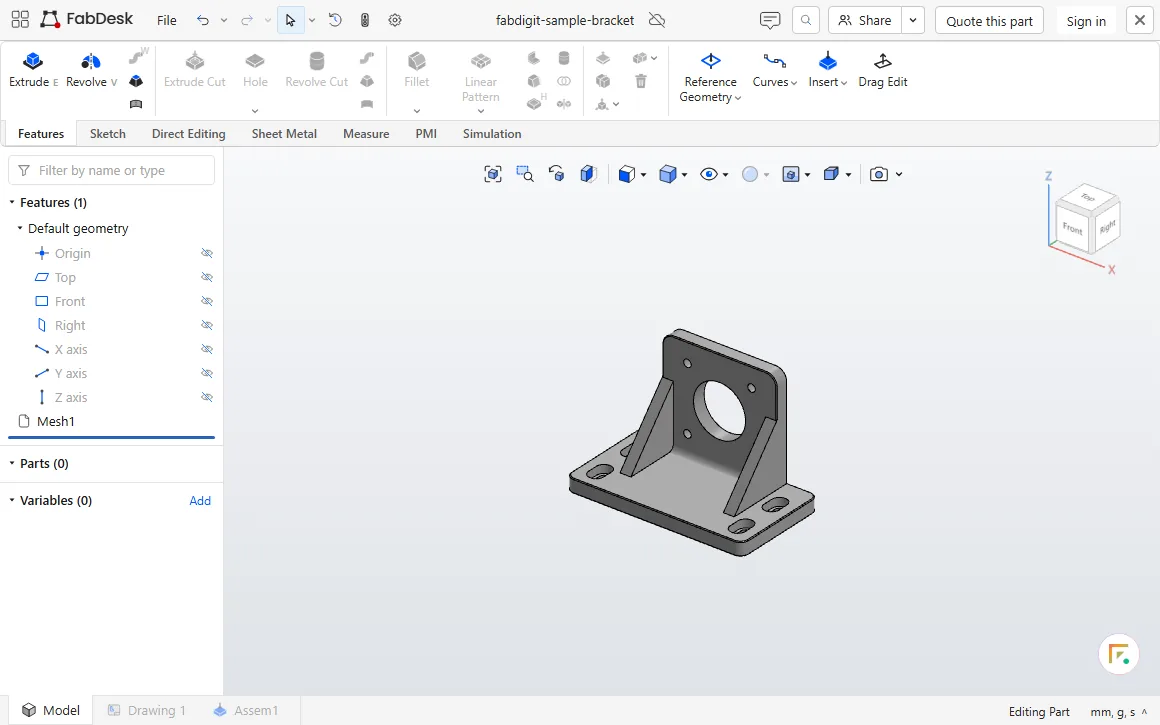
FBX as a mesh
The same triangles go into the STL.
More you can do once it is open in FabDesk
On a computer the file opens in FabDesk, our free online CAD. These work there with a free account.
Save as another format
File › Export writes STEP, IGES, FreeCAD (.FCStd), STL, 3MF, OBJ, Rhino (.3dm, as a mesh), GLB, FBX or USDZ, and drawings as PDF, DXF or SVG. A closed mesh can first become a solid with Convert to Body.
CAD Cloud and version history
Parts save to your account in folders as you work. Version history lists every saved change and the versions you name: open an older one, or restore it.
Share it
Invite people by email to view or edit, or send a link limited to your workspace or to anyone signed in, with an expiry date.
Edit and draw
A part that opens as a solid takes new holes, cuts, fillets and shells, and gets a 2D drawing with section views, dimensions and GD&T.
Simulation
Run a linear static or natural-frequency study: fix faces, load faces, and read stress, displacement and factor of safety. Meshing and solving run in the cloud.
Assemblies and sheet metal
Put parts together with mates and check them for interference, or build sheet metal with flanges, hems and a flat pattern.
From an FBX to a print
FBX models come from animation and game tools: Blender, Maya, 3ds Max, Unity. An STL holds only the triangles, which is what a slicer needs. Converting keeps the shape and drops textures, bones and animation.
A model made for a screen is not always printable: it may be open (a single surface, no thickness) or made of overlapping pieces. It still converts to STL, but check it in your slicer, and use Convert to Body to see whether it is one closed solid.
STEP and IGES: an exact circle
The file stores the hole as a true circle of 20 mm diameter. CAD programs, CAM and the quote read the size directly, so the part can be edited, drawn and machined.
STL and OBJ: flat triangles
The same hole becomes 16 straight edges whose middles sit 0.19 mm inside the true circle. A finer mesh gets closer but is never round; 3D-printing slicers read this form.
What carries over
| From the FBX | In the STL |
|---|---|
| Shape | Yes, the same triangles |
| Size | Yes, in millimetres |
| Several objects | One STL with all of them |
| Textures, colours, materials | No (STL has none) |
| Bones and animation | Rest pose only |
Supported formats
Every tool accepts the same file types.
| Format | Extensions | Opens as |
|---|---|---|
| STEP | .step, .stp | 3D solid: view, measure, edit, draw and price (FabDesk on a computer) |
| IGES | .iges, .igs | 3D solid or surface: view, measure, edit and price (FabDesk on a computer) |
| STL | .stl | 3D mesh: view, measure and price |
| OBJ | .obj | 3D mesh: view, measure and export |
| 3MF, glTF / GLB, PLY, AMF | .3mf, .glb, .gltf, .ply, .amf | 3D mesh: view, measure, convert to STL; closed meshes convert to a STEP body |
| DXF | .dxf | 2D drawing: view, measure and price |
| AutoCAD drawing | .dwg | 2D drawing, R13 (1994) to the 2018 format: read on our server and opened like a DXF (view, measure, extrude, price) |
| FBX, DAE (COLLADA), 3DS, SVG | .fbx, .dae, .3ds, .svg | Opened in FabDesk on a computer: FBX, DAE and 3DS as a mesh, an SVG as a sketch to extrude |
| SOLIDWORKS assembly | .sldasm | 3D mesh when the file holds every part; otherwise save it as STEP and open the STEP |
| SOLIDWORKS part | .sldprt | 3D solid when it reads exactly, otherwise the display mesh SOLIDWORKS saved: view and measure (FabDesk on a computer) |
| NX part | .prt | 3D solid when the file confirms it, otherwise a mesh: view and measure (FabDesk on a computer) |
| FreeCAD part | .fcstd | 3D solid |
| Fusion design | .f3d | 3D solids, every body in place, when each body checks out; otherwise a mesh (FabDesk on a computer) |
| Inventor part | .ipt | Exact part when every body checks out, otherwise a mesh |
| CATIA part | .catpart | 3D solid when the part checks out (a closed, valid solid that matches its own preview), otherwise a mesh: view and measure (FabDesk on a computer) |
| Creo, Rhino, ACIS | .prt, .3dm, .sat, .sab | Mesh: view and measure (FabDesk on a computer). Save as STEP to edit |
| Parasolid | .x_t, .x_b | 3D solid when the body checks out (closed, every edge on its faces): view, measure and price |
| JT | .jt | Mesh for JT 8, 9 and 10 files: view and measure. JT 7 and older: save as STEP, or upload the file to a quote |
Limits
- Files up to 50 MB and 1,000,000 triangles.
- FBX 2011 (7.0) or later.
- Needs a computer with a mouse and a window at least 768 px wide; downloading needs a free account.
FAQ
How do I convert FBX to STL?
Drop the FBX on this page. On a computer it opens in FabDesk; choose File, then Export, then STL.
Will the STL be the right size?
Yes. The FBX unit is read and the STL is written in millimetres. Measure it in FabDesk first: models made for games are often at a different scale from the part you want.
Can I print it straight away?
Only if it is closed. Right-click the mesh and choose Convert to Body: if it becomes a body, it is watertight. If not, repair it in your slicer or Blender first.
Can I get a STEP file?
Yes, when the model is closed: right-click it, choose Convert to Body, then File, Export, STEP.
Is my file uploaded to FabDigit?
Yes. We upload it over an encrypted connection to open and price it. Only FabDigit and people with your share link can access it.
Is it free?
Yes. Opening and measuring a file need no account. Sign in to get an instant price.
More free tools
- FabDesk online CADModel or edit a part in your browser and make its 2D drawing.
Open and measure
- Online CAD viewerOpen STEP, SOLIDWORKS, Inventor, IGES, STL and DXF files in one viewer.
- 3D file viewerOpen STL, OBJ, 3MF, GLB and STEP models in 3D in your browser.
- STEP viewerOpen STEP and STP files, measure them and get a 2D drawing.
- SLDPRT viewerOpen SOLIDWORKS part files without SOLIDWORKS and measure them.
- SLDASM viewerOpen SOLIDWORKS assemblies, or save them as STEP and open that.
- Inventor file viewerOpen Autodesk Inventor .ipt parts without Inventor and measure them.
- CATIA file viewerOpen CATIA V5 .CATPart parts without CATIA and measure them.
- IGES viewerOpen IGES and IGS files in 3D and measure them.
- STL viewerView STL meshes in 3D and check their size before printing.
- G-code viewerSee the tool paths in a G-code file layer by layer, with the print time and filament.
- 3D print time estimatorEstimate a 3D print time and filament from its G-code, planned like printer firmware.
- NC viewerOpen an NC or G-code program and play the tool path move by move.
- G-code simulatorPlay a G-code program move by move and see the tool or nozzle path build up.
- OBJ viewerOpen OBJ models in 3D and measure them.
- 3MF viewerOpen 3MF print files in 3D and measure them.
- GLB viewerOpen GLB and glTF models in 3D and measure them.
- PLY viewerOpen PLY meshes and scans in 3D and measure them.
- FBX viewerOpen FBX models in 3D, measure them and save them as STL.
- DAE viewerOpen COLLADA (.dae) models in 3D, measure them and save them as STL.
- GlTF viewerOpen .gltf models with their .bin in 3D and measure them.
- 3DS viewerOpen 3D Studio (.3ds) models in 3D, measure them and save them as STL.
- 3DM viewerOpen Rhino .3dm models without Rhino and measure them.
- NX part viewerOpen Siemens NX .prt parts without NX and measure them.
- X_T viewerOpen Parasolid .x_t and .x_b files as exact parts and measure them.
- JT viewerOpen Siemens JT files in 3D and measure them.
- F3D viewerOpen Fusion 360 .f3d designs without Fusion and measure them.
- FreeCAD viewerOpen FreeCAD .fcstd files online as exact parts.
- SAT file viewerOpen ACIS .sat and .sab parts in 3D and measure them.
- DXF viewerView and measure DXF drawings and flat patterns.
- DWG viewerOpen AutoCAD DWG drawings without AutoCAD.
Edit
- STEP editorChange a STEP file in your browser: move faces, add holes and cuts, export STEP.
- Online STL editorEdit an STL in your browser: cut, add holes, fillet, save.
- STL repairFix holes, cracks, flipped and duplicate triangles in an STL, then save it.
- STL simplifierReduce an STL file size: keep fewer triangles, keep the shape, save a smaller STL.
- G-code editorEdit a G-code program next to its 3D tool path, then download it.
Convert to STEP, IGES or FCStd
- FBX to STEP converterTurn an FBX model into a STEP without CAD software.
- FBX to FCStd converterTurn an FBX model into an FCStd without CAD software.
Convert meshes
- STEP to STL converterTurn a STEP model into an STL for a slicer, in mm or inches.
- SLDPRT to STL converterTurn a SOLIDWORKS part into an STL for a slicer, without SOLIDWORKS.
- SLDASM to STL converterTurn a SOLIDWORKS assembly and its parts into one STL, without SOLIDWORKS.
- X_T to STL converterTurn a Parasolid .x_t or .x_b part into an STL for a slicer.
- F3D to STL converterTurn a Fusion 360 .f3d design into an STL without Fusion.
- FCStd to STL converterTurn a FreeCAD .fcstd document into an STL without FreeCAD.
- IPT to STL converterTurn an Inventor .ipt part into an STL without Inventor.
- PRT to STL converterTurn a Siemens NX .prt part into an STL without NX.
- SAT to STL converterTurn an ACIS .sat or .sab part into an STL for a slicer.
- OBJ to STL converterTurn an OBJ mesh into an STL for a slicer.
- 3MF to STL converterTurn a 3MF print file into an STL.
- GLB to STL converterTurn a GLB or glTF model into an STL for printing.
- GlTF to STL converterTurn a glTF model, with its .bin, into an STL for printing.
- PLY to STL converterTurn a PLY mesh or scan into an STL.
- DAE to STL converterTurn a COLLADA (.dae) model into an STL for 3D printing.
- FBX to OBJ converterTurn an FBX model into an OBJ.
- STL to FBX converterTurn an STL, OBJ or STEP model into a binary FBX.
- OBJ to FBX converterTurn an OBJ model into a binary FBX for Unity, Blender or Maya.
- GLB to FBX converterTurn a GLB or glTF model into a binary FBX for Blender, Unity or Maya.
- DAE to FBX converterTurn a COLLADA (.dae) model into a binary FBX.
- FBX to GLB converterTurn an FBX model into a GLB for the web and AR.
- IGES to STL converterTurn an IGES or IGS model into an STL for a slicer.
- 3DS to STL converterTurn a 3D Studio (.3ds) model into an STL.
- 3DM to STL converterTurn a Rhino .3dm model into an STL without Rhino.
- CATPart to STL converterTurn a CATIA V5 part into an STL without CATIA.
- JT to STL converterTurn a JT file into an STL without NX or Teamcenter.
- STEP to FBX converterTurn a STEP file into an FBX without CAD software.
- IGES to FBX converterTurn an IGES file into an FBX without CAD software.
- SLDPRT to FBX converterTurn a SOLIDWORKS part into an FBX without SOLIDWORKS.
- IPT to FBX converterTurn an Inventor part into an FBX without Inventor.
- CATPart to FBX converterTurn a CATIA V5 part into an FBX without CATIA.
- PRT to FBX converterTurn a Siemens NX part into an FBX without NX.
- F3D to FBX converterTurn a Fusion 360 design into an FBX without Fusion.
- FCStd to FBX converterTurn a FreeCAD document into an FBX without FreeCAD.
- X_T to FBX converterTurn a Parasolid file into an FBX without CAD software.
- SLDASM to FBX converterTurn a SOLIDWORKS assembly into an FBX without SOLIDWORKS.
- JT to FBX converterTurn a JT file into an FBX without NX or Teamcenter.
- 3DM to FBX converterTurn a Rhino model into an FBX without Rhino.
- SAT to FBX converterTurn an ACIS part into an FBX without CAD software.
- 3MF to FBX converterTurn a 3MF file into an FBX without your slicer.
- GlTF to FBX converterTurn a glTF model into an FBX without CAD software.
- PLY to FBX converterTurn a PLY mesh into an FBX without the scanner software.
- FBX to 3MF converterTurn an FBX model into a 3MF without CAD software.
- FBX to glTF converterTurn an FBX model into a glTF without CAD software.
- FBX to USDZ converterTurn an FBX model into a USDZ without CAD software.
- FBX to 3DM converterTurn an FBX model into a 3DM without CAD software.
- 3DS to FBX converterTurn a 3D Studio model into an FBX without CAD software.
2D drawings and outlines
- DXF to STL converterExtrude a DXF outline into a 3D part and save it as STL or STEP.
- SVG to STL converterTurn an SVG outline into a 3D part and save it as STL or STEP.
From a picture or text
- Lithophane makerTurn a photo into a lithophane STL: thick where it is dark, thin where it is light.
- Text to STL generatorType text and download raised 3D letters as an STL: a sign, name tag or keychain.
- Image to STL converterTurn a picture (PNG, JPG, WebP) into a 3D part: trace it, extrude it, save an STL.
- PNG to STL converterTurn a PNG logo or silhouette into a 3D part: trace it, extrude it, save an STL.
- JPG to STL converterTurn a JPG logo or silhouette into a 3D part: trace it, extrude it, save an STL.
- Image vectorizerVectorize a bitmap logo or illustration into SVG shapes, in 1 to 8 flat colours.
Ready to order?
Configure the material, finish and quantity. Our engineers review every order before production.