
Free FEA software in your browser
Run finite element analysis on the part you model or import, right in FabDesk: static stress, frequency, buckling, thermal, linear dynamic, fatigue and pressure vessel studies. Free, with nothing to install.
A study in four steps
The Simulation tab sits next to Features and Sketch, on the same part. Change the part and run the study again; there is nothing to export and no second program.
- 01
Study
New Study: static, frequency, buckling, thermal, linear dynamic, fatigue or pressure vessel.
- 02
Material
Pick a material from the FabDesk library for each body.
- 03
Fixtures and loads
Hold the faces that are held and load the faces that carry the load: a bearing load on a bore, pressure in a tank, convection on a heat sink.
- 04
Run
Stress, displacement, factor of safety, mode shapes or temperature appear on the part.
Study types
| Study | What it tells you |
|---|---|
| Static | Stress, displacement, strain and factor of safety under forces, pressure, torque, bearing loads and gravity. |
| Frequency | Natural frequencies, mode shapes and modal mass participation. |
| Buckling | Predicted buckling load factors and their corresponding mode shapes. |
| Thermal | Steady-state or transient temperature and heat flux for specified temperatures, convection, applied heat flux or heat input power. |
| Linear Dynamic | Structural response using modal time history, harmonic, response spectrum or random vibration analysis. |
| Fatigue | Damage and life under repeated loading, from an S-N curve and the static results of each load case. |
| Pressure Vessel Design | Combines results from static load cases for pressure vessel stress checks. |
Fixtures, loads and connections
| Kind | Available |
|---|---|
| Fixtures | Fixed geometry, roller / slider, fixed hinge, elastic support, symmetry and circular symmetry, on flat, cylindrical and spherical faces or along reference geometry. |
| Structural loads | Force, torque, pressure, bearing load, remote load, gravity, centrifugal force and distributed mass. |
| Thermal loads | Temperature, convection, heat flux and heat power, with an initial temperature for a transient study. |
| Loads over time | Time and frequency curves from the curve library for transient thermal and linear dynamic studies. |
| Connections | Contact between bodies, bonded faces, pins, bolts, springs and bearings. |
| Mesh | Automatic, with mesh controls on chosen faces and a mesh quality plot. |
Reading the results
Plots on the part
Stress, displacement, strain and factor of safety on the deformed shape, with the minimum and maximum marked.
Probe and lists
Probe any point, plot it over time in a transient study, or list the results. Frequency studies list natural frequencies and mass participation.
Animate and clip
Animate the deformation or a mode shape, clip the part to see inside, and compare plots side by side.
Example: an aluminum angle bracket
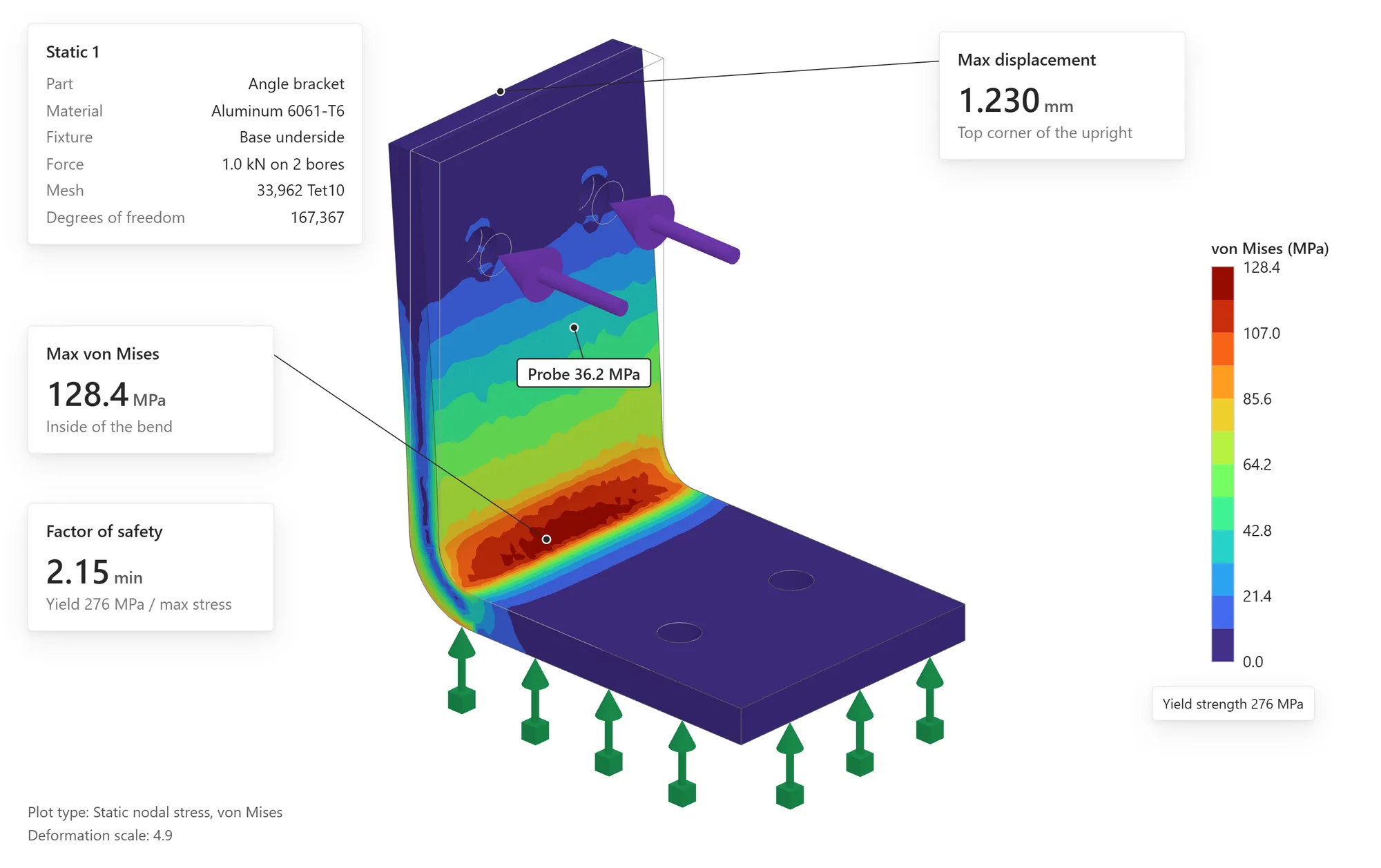
The base is fixed and a 1 kN load sits on the upper holes. Peak stress is 128 MPa, at the inside of the bend, with a factor of safety of 2.15 against yield.
FAQ
Is there free FEA software?
Yes. FabDesk runs static, frequency, buckling, thermal, linear dynamic, fatigue and pressure vessel studies in the browser, free, and commercial use is allowed.
Do I need to install anything?
No. Everything runs in Chrome or Edge, so it works on a Mac or a Chromebook too.
Can I simulate a STEP or SOLIDWORKS part?
Yes. Open the STEP, IGES or SOLIDWORKS part in FabDesk and set up the study in the Simulation tab.
What results does a static study give?
Von Mises and principal stresses, displacement, strain and factor of safety, as plots on the deformed shape, probe values or result lists.
Can FabDesk find natural frequencies?
Yes. A frequency study lists the natural frequencies and mass participation, and each mode shape can be plotted and animated.
Can I run a transient thermal study?
Yes. Set an initial temperature, apply thermal loads that change over time, and probe the temperature at any point over time.
Does FabDesk do fatigue analysis?
Yes. A fatigue study takes the static load cases and an S-N curve and gives damage, life and the load factor.
Does it support contact between parts?
Yes. Bodies can be bonded or in contact, and pins, bolts, springs and bearings connect them.
Run a study on your part
Open the Simulation tab in FabDesk. Free, nothing to install.