
Marking, decoration & colour · finish comparison
Dot Peen Marking vs Laser Marking
Dot Peen Marking and Laser Marking are both marking & decoration finishes; dot peen is the lower-cost option ($).
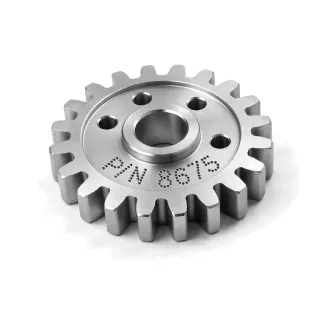
Dot Peen Marking
Marking & decoration · $ · instant quote
Dot peen marking uses a controlled stylus to build characters and Data Matrix symbols from small permanent indentations.
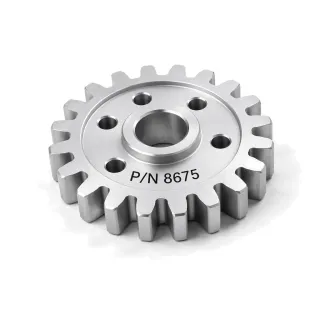
Laser Marking
Marking & decoration · $ · instant quote
Laser marking uses focused fiber, CO2, or UV energy to create permanent text, logos, serials, UDI, and machine-readable codes.
When to choose which
Choose Dot peen
Choose Dot peen when for robust indented codes on rough metal.
- Automates variable serial and lot data
- Creates 50–500 µm permanent indentations
- Marks rough or scaled metal more robustly than many optical colour-change methods
Choose Laser mark
Choose Laser mark when for finer, quieter, noncontact marking.
- Creates variable serials and UDI without a physical printing tool
- Supports about 0.10 mm minimum line width
- Annealed colour-change marks add no depth; shallow engraving is typically 5–50 µm
What the numbers say
- Dot peen is the lower-cost option ($).
- Laser mark is the thinner coating (0–50 µm), so it disturbs tight fits less.
Scores side by side
Each score is 0–100 against every finish in this catalog. Corrosion is derived from salt-spray test duration and surface hardness from the finish layer's Vickers hardness where a measured figure exists; a finish that leaves the base metal's own surface is not rated for hardness. Cosmetic, lubricity and cost are FabDigit's engineering assessment. Scores and typical figures are screening data, not matched side-by-side tests or service-life rankings; ASTM B117 is a controlled salt-fog method, not a field-life prediction.
| Score | Dot peen | Laser mark |
|---|---|---|
| Corrosion resistance | 0 Minimal | 0 Minimal |
| Surface hardness / wear | — — | — — |
| Cosmetic quality | 35 Fair | 70 Very good |
| Lubricity | 10 Minimal | 10 Minimal |
| Cost | 18 $ | 18 $ |
Key numbers
| Property | Dot peen | Laser mark |
|---|---|---|
| Thickness | 50–500 µm | 0–50 µm |
| Electrical | Unchanged | Unchanged |
| Colours | substrate colour, shadow contrast | black, white, grey, substrate contrast, limited colour effects on selected materials |
| Relative cost | Budget ($) | Budget ($) |
| Added lead time | 1–2 working days | 1–3 working days |
| RoHS | Compliant | Compliant |
| Instant quote | Yes | Yes |
Bold marks the side that is ahead on a row where more (or less, for cost and lead time) is better. Ranges are the typical specification window; the drawing call-out fixes the class.
Which materials take each finish
| Material family | Dot peen | Laser mark |
|---|---|---|
| Aluminum | Yes | Yes |
| Brass | Yes | Yes |
| Stainless Steel | Yes | Yes |
| Steel | Yes | Yes |
| Titanium | With care | Yes |
| Ceramic | No | With care |
| Copper Alloy | With care | With care |
| Glass | No | With care |
| Magnesium Alloy | With care | With care |
| Polymer | Limited | With care |
| Zinc Alloy | With care | With care |
Specifications and drawing call-outs
Dot peen
- MIL-STD-130 — Identification Marking of U.S. Military Property
DOT PEEN MARK PER MIL-STD-130, DATA MATRIX ECC200, 8 × 8 MM, 0.25 MM DOT PITCH, 0.10–0.20 MM DEEP, GRADE 2.5 MIN PER ISO 15415
Laser mark
- MIL-STD-130 — Identification Marking of U.S. Military Property
LASER MARK PER MIL-STD-130, DATA MATRIX ECC200, 6 × 6 MM, 0.10 MM MIN CELL, CONTRAST ≥ 30 %, GRADE 2.5 MIN PER ISO 15415
Dot peen vs Laser mark — frequently asked
What is the difference between Dot peen and Laser mark?
Dot Peen Marking and Laser Marking are both marking & decoration finishes; dot peen is the lower-cost option ($). Laser mark is the thinner coating (0–50 µm), so it disturbs tight fits less.
When should I use Dot peen instead of Laser mark?
Choose Dot peen when for robust indented codes on rough metal. Conversely: choose Laser mark when for finer, quieter, noncontact marking.
Is Dot peen or Laser mark cheaper?
Dot peen is the lower-cost finish ($ against $ for Laser mark) among the finishes FabDigit quotes. Both are priced per part with a lot minimum; the exact figure appears on the instant quote once the part is uploaded.